The Service Connections page displays the connections that allow your Recast Management Server to query information from third-party services. You can find the page in RMS by navigating to Administration > Service Connections.
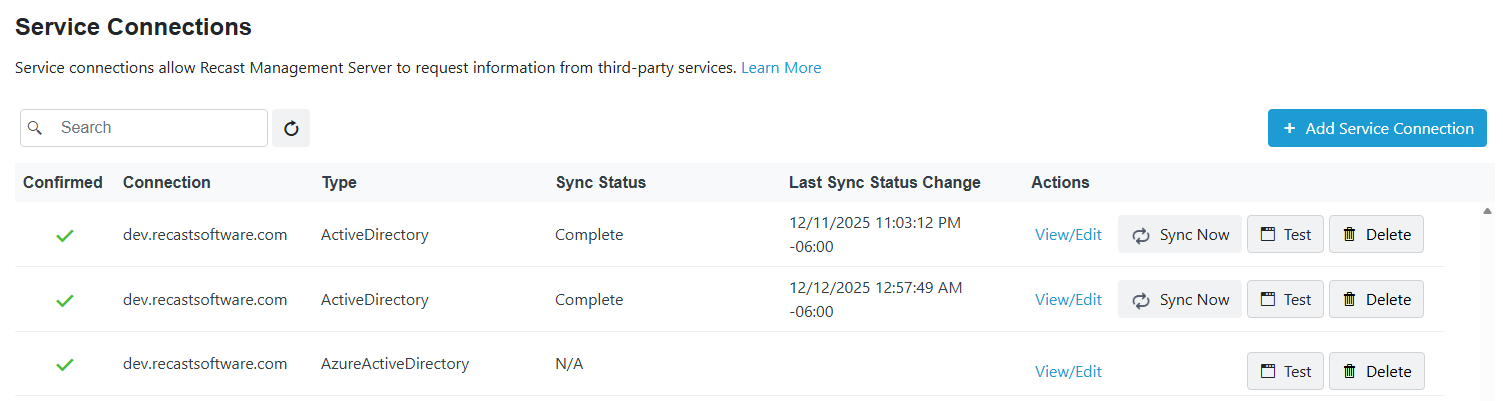
Service connection details and actions:
- Confirmed: Shows whether a service connection is confirmed as available for use. You can confirm a service connection that is not currently available by clicking View/Edit and the Confirmed check box.
- Connection: Service connection name
- Type: Active Directory, Azure Active Directory (Entra ID), MEMCM (Configuration Manager), MBAM, SMTP. For information on the service connection requirements for Recast products and features, see Service Connection Types.
- Sync Status: Current status of a service connection data sync.
- In Progress - Recast Management Server is actively retrieving service connection data
- Complete - Data sync has completed successfully
- Error - Data sync has failed
- Unknown - Displayed before an initial Active Directory or Configuration Manager data sync or when IIS is reset after a data sync
- N/A - Currently displayed for Azure Active Directory(Entra ID) and MBAM service connections.
- Last Sync Status Change: Date and time the latest service connection data sync started, completed, or failed. For information on viewing or editing the data sync schedule, see Synchronize Service Connection Data.
- Actions
- View/Edit service connection details. See Edit a Service Connection.
- Sync Now to immediately update service connection data from Configuration Manager or Active Directory. See Synchronize Service Connection Data.
- Test the connection between your Recast Management Server and a third-party service.
- Delete a service connection so that your Recast Management Server will no longer request data from the third-party environment.
NOTE: When a service connection is deleted, your Recast Management Server can no longer query information from the third-party environment.
