On Recast's Application Catalog page, you can browse the 100 most commonly used applications that Right Click Tools Patching supports. The list also includes some key software used in healthcare, education, government, finance, and other fields.
This compilation represents just a fraction of the 6000+ applications in the Patching catalog.
The Recast Management Server Applications page displays the entire Right Click Tools Patching catalog, as well as any custom applications you add. While all Recast customers with access to RMS can view the full catalog, the number of software applications available for deployment depends on your Recast licensing.
The Recast Catalog tab displays RCT Patching-supported applications. The My Catalog tab lists your custom applications.
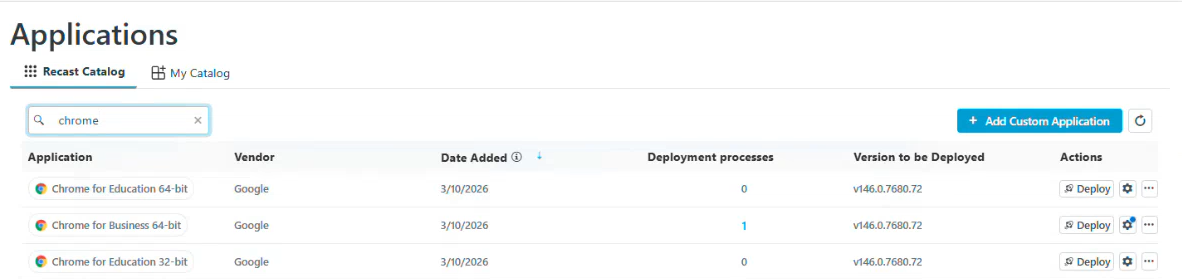
Application information:
- Application name
- Vendor
- Date Added: Sorted by most recent release date by default
- Deployment Processes: Click the number link to view deployment processes that include the application
- Version to be Deployed
- Actions
- Deploy an application immediately
- View deployment process settings - a blue badge on the Settings cog indicates that one or more deployment process settings has been changed for this application. See Configure Deployment Process Settings for an Individual Application.
- Remove an application from a deployment process
- Delete an application
All Right Click Tools Enterprise customers and Community users can see and search the entire catalog of applications that can be deployed and updated using Right Click Tools Patching. Use the Catalog Search feature in your Configuration Manager console to explore the 6000+ applications in the catalog or to quickly check that a specific application is available to deploy and/or update with RCT Patching.
NOTES:
- You do not require a Patching license to view and search the full application catalog.
- This feature requires outbound access to the application catalog at https://amprod02.recastsoftware.com.
- This feature is available in Recast Software Version 5.11.2509.1603 or later.
- Each column is sortable and all catalog information is searchable.
To locate the Patching Catalog in Configuration Manager:
1. Navigate to Assets and Compliance > Overview > Devices.
2. Right-click on a device and select Patching > Catalog Search.
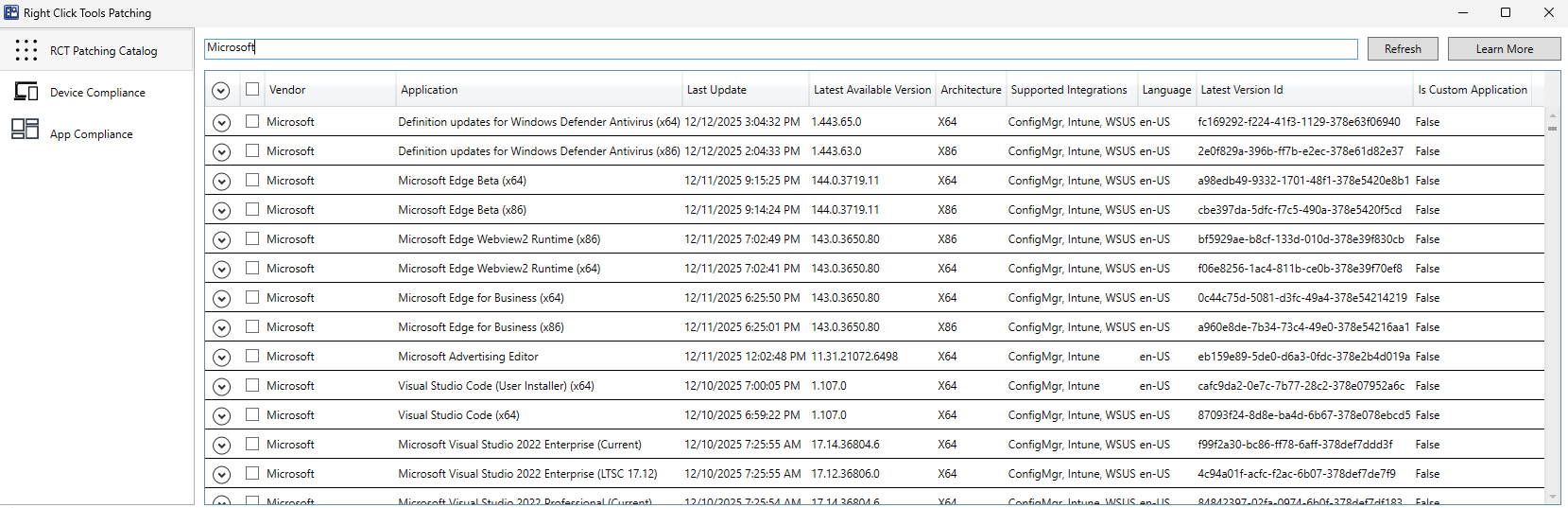
The Patching Catalog displays the following application information:
- Vendor
- Application name
- Last Update date
- Latest Available Version number
- Architecture
- Supported Integrations (Configuration Manager, Intune. WSUS)
- Language
- Latest Version ID
- Custom Application (True/False)

Prior to creating applications and deployments for Configuration Manager or Intune, Right Click Tools Patching always verifies that the application media it downloads is valid and remains unchanged from the version that Recast's application management team downloads from the vendor and publishes to the Setup Store.
The Setup Store contains the thousands of curated applications available via Right Click Tools Patching.
Applications are published to the Setup Store once our application management team establishes the validity of their content. The Recast Application Catalog then consumes Setup Store metadata added by the team, allowing Patching to confirm that the content remains unchanged.
Content Verification Process:
1. Recast's application management team downloads the installation media from the vendor and adds application metadata to the Setup Store. The metadata includes the download link to the installer and the hash checksum calculated from the installation media downloaded from the vendor.
2. The Recast Application Catalog consumes the Setup Store metadata and downloads the installation media from the Setup Store storage account. After download, the checksum is calculated and compared with the checksum in the Setup Store metadata.
NOTE: Should the installation media fail to download directly from the Setup Store, the Application Catalog downloads the installation media from the vendor using the download link in the Setup Store metadata. The checksum validation steps are identical.
3. When the checksum matches (confirming that we are using the same installation media the Setup Store team used when generating the metadata), Patching creates a ZIP file from the installer, calculates the hash checksum from the ZIP file, and stores it within the application catalog metadata.
4. When the Recast Management Server contacts the Recast Catalog, it receives the checksum for the ZIP file.
5. The Recast Management Server requests the download URL from the Recast Catalog. The URL to the Azure storage account uses a short-lived SAS token.
6. The Recast Proxy downloads the ZIP file from the Azure storage account using the download URL. After download, the hash checksum is calculated from the downloaded ZIP file and compared with the checksum in the Recast Application Catalog metadata.
7. When the checksum matches the value received from the Recast Catalog, meaning that the ZIP file is unchanged and the content matches what the application management team used when generating the original metadata in the Setup Store, Patching continues to create applications and deployments for ConfigMgr or Intune.